


A rotor thins at the wear track for years before anything sounds wrong. This laser-cut gauge settles it in seconds: six slots from 1.5 to 2.3 mm cover the minimum-thickness figures the major rotor brands publish, and a rotor thin enough to slip into its slot has worn to or past that limit and needs replacing.
In stock
Couldn't load pickup availability
Free US shipping on orders $75+
Some exceptions apply — see shipping policy
Forged in Zreče, Slovenia since 1919. Sponsors professional road and mountain-bike race teams.


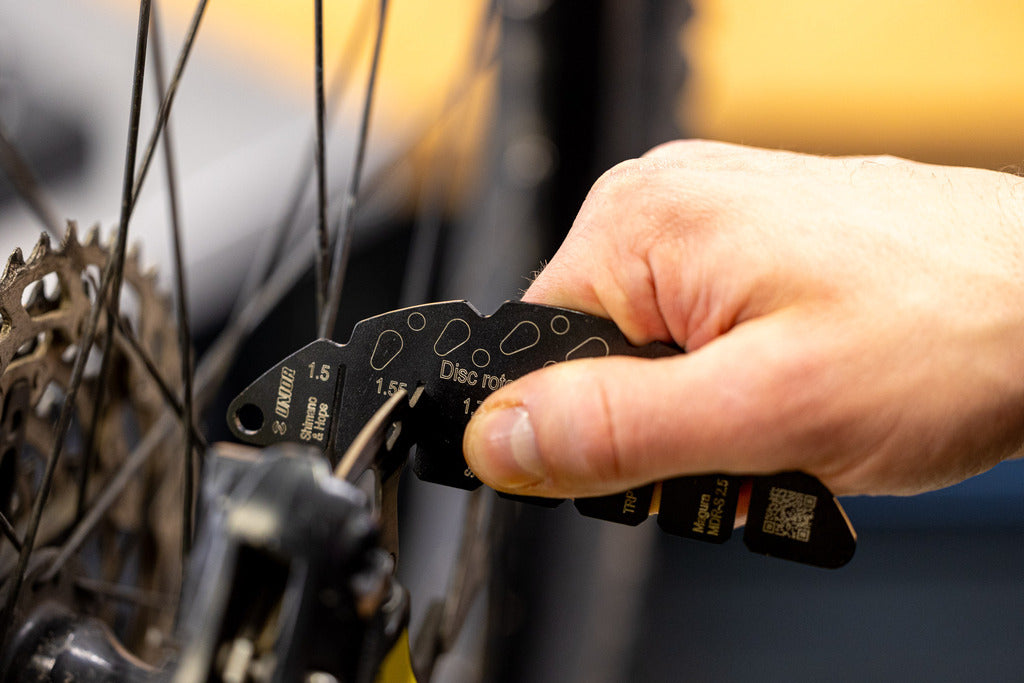
A disc rotor wears thinner over service life. The brake pad slowly removes metal at the wear track, and the rotor crosses its manufacturer-published minimum thickness somewhere between two and four years of regular use (depending on rider weight, terrain, pad compound, and how much the brakes get dragged). Past that minimum, the rotor is below safe service spec and needs replacement. The Rotor Wear Indicator is the laser-cut gauge that tells you whether a rotor is still inside the safe window or has crossed it.
The gauge has six precision laser-cut slots: 1.5 mm, 1.55 mm, 1.7 mm, 1.8 mm, 2.0 mm, and 2.3 mm. Each slot is sized to the published minimum thickness used by the most common disc-brake rotor manufacturers for that rotor's class. The etched labels pair each slot with its rotor family: 1.5 mm for Shimano and Hope, 1.55 mm for SRAM CL, 1.7 mm for SRAM HS2, 1.8 mm for Magura, 2.0 mm for TRP and Tektro, and 2.3 mm for Magura MDR-S 2.5. Fit a slot over the rotor's wear track. If the rotor does not pass into the slot, the rotor is still above that minimum and within service. If the rotor does pass into the slot, the rotor has reached or fallen below that minimum and should be replaced. Always check the minimum thickness specification stamped on the rotor or printed in the manufacturer's service documentation; the gauge's slots cover the range of common minimums, but the specific rotor's spec is the authoritative number.
The gauge is a go/no-go reading rather than a thickness measurement. You don't need a digital number to know whether a rotor is past spec; you need a fast yes-or-no at intake. The QR code on the gauge body links to a video walkthrough that covers the wear-track-versus-edge distinction (only the rotor face the pads actually contact is the right place to measure).
Specs
- Function: go/no-go gauge for disc-brake rotor thickness
- Six laser-cut measuring slots: 1.5 mm, 1.55 mm, 1.7 mm, 1.8 mm, 2.0 mm, 2.3 mm
- Slot logic: if the rotor passes into the slot, it's at or below that minimum thickness
- QR code linking to step-by-step video guide
- Integrated hanging hole
- Weight: 55 g
Built in Zreče, Slovenia
Unior has been forging hand tools in Zreče since 1919, and sponsors professional road and mountain-bike race teams. Laser-cut gauges are the construction-process where the cut surface itself is the working face of the tool, which is why this gauge holds the published minimums as a reference dimension rather than a printed marking that wears off. The same construction approach is used on the chain-wear gauges in the Unior catalog; the geometry differs but the precision principle is the same.
Pro tip from our mechanics
Measure the rotor before you decide to true it. A rotor that's already below the manufacturer's wear limit is past saving by truing; pulling on a fatigued rotor with a fork bends grain that's no longer uniform and risks a fatigue crack at the next big braking input. The wear check is also worth doing on every brake service intake, because thickness wear is silent until it isn't, and a customer who's about to leave with a rotor at 1.45 mm doesn't know it. Our disc-brake-rub guide walks the diagnostic order that puts measurement before action, so the truing fork comes out only when the rotor is worth truing: Fix disc brake rub →
FAQ
How do you measure disc rotor wear? Check the wear track (the band the pads actually touch), never the rotor's outer edge. Fit the matching gauge slot over the track: a rotor that enters the slot is at or under that minimum thickness and needs replacing, and the spec stamped on your rotor is the authoritative number.
Which minimum thicknesses do the six slots cover? The slots are laser-cut at 1.5, 1.55, 1.7, 1.8, 2.0, and 2.3 mm, matching the published minimums the most common disc rotor manufacturers use for each rotor class.
Is this a thickness measurement tool or a go/no-go gauge? It's a go/no-go gauge: each slot gives a yes-or-no answer against one published minimum rather than a numeric reading, which is the fast check a service intake needs. A QR code on the body opens a video showing the technique, including why you measure at the wear track rather than the rotor edge.
 Tech Tips
Fix Disc Brake Rub
Tech Tips
Fix Disc Brake Rub
